Source Code Hosting Platforms: GitHub and the Alternatives
You will end up on GitHub: most projects you’ll use or contribute to live there, and every tutorial assumes it. A few communities chose otherwise, for reasons of control, workflow or principle: GNOME runs its own GitLab, Zig moved to Codeberg, and the Linux kernel still takes patches by email. Here’s where each one lives, and what changes when you contribute there.
GitHub is where you’ll start#
More than 180 million developers have an account on GitHub, and 36 million joined in a single year, according to Octoverse 2025. A repository there comes with everything a project needs (1), and a Sponsor button (2) when the maintainers accept money:
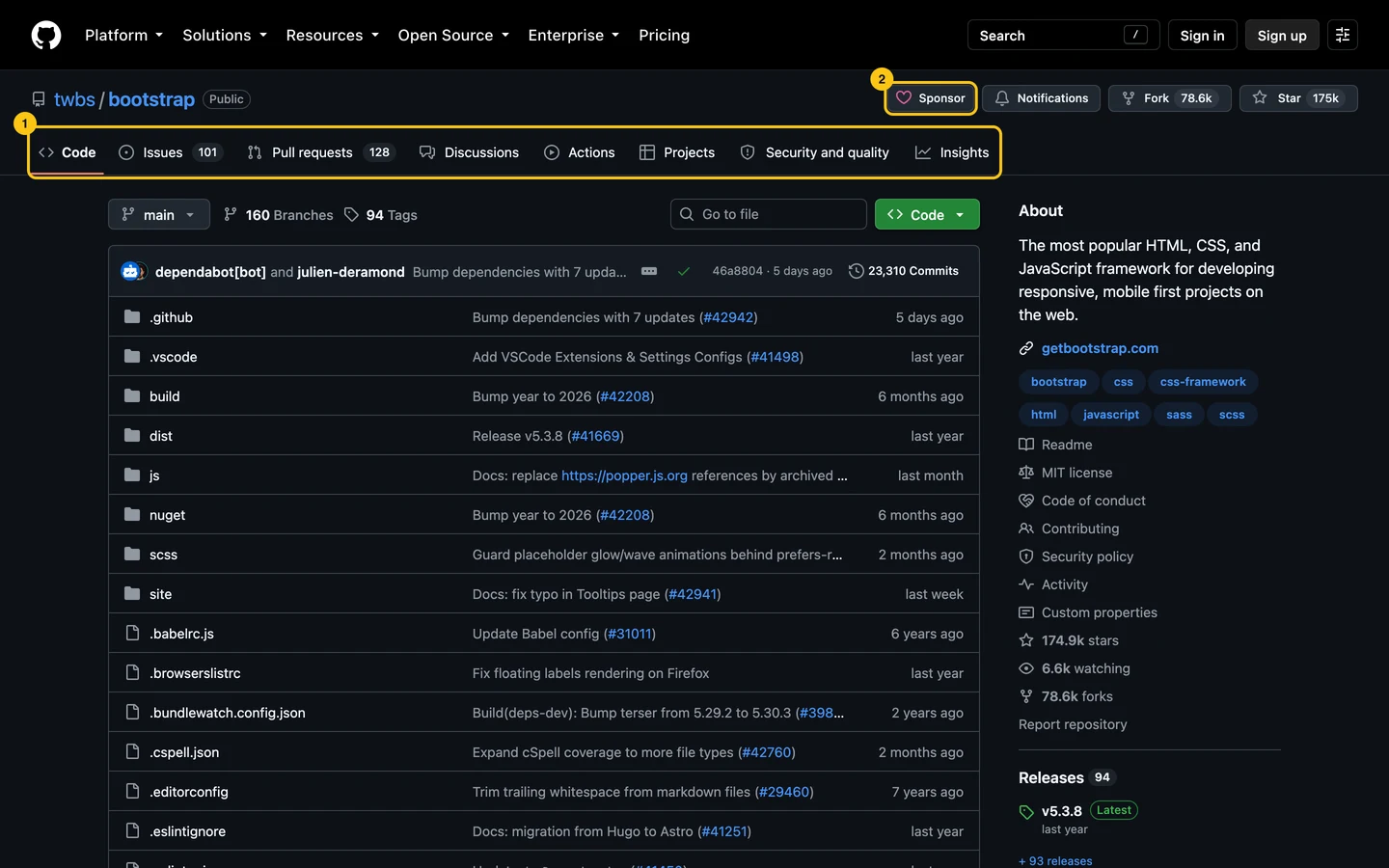
- Issues and pull requests: the contribution flow every other platform copies. Git and GitHub Basics covers it.
- Actions: CI, free on public repositories with GitHub’s standard runners.
- Discussions, Sponsors, Codespaces and Copilot: questions, money, a cloud editor, AI, in the same account.
Microsoft has owned GitHub since 2018. Some projects left over it, or over the AI features spreading across the site: Zig’s announcement gives one project’s reasons. For a contributor, that changes nothing: the projects are where they are.
GitLab is the one you can run yourself#
GitLab is two things: gitlab.com, a hosted service like GitHub, and a product you can install on your own server. Large communities do the second, to own their data and their accounts:
| Community | Instance |
|---|---|
| GNOME | gitlab.gnome.org |
| Debian | salsa.debian.org |
| KDE | invent.kde.org |
| freedesktop.org | gitlab.freedesktop.org (Mesa, Wayland) |
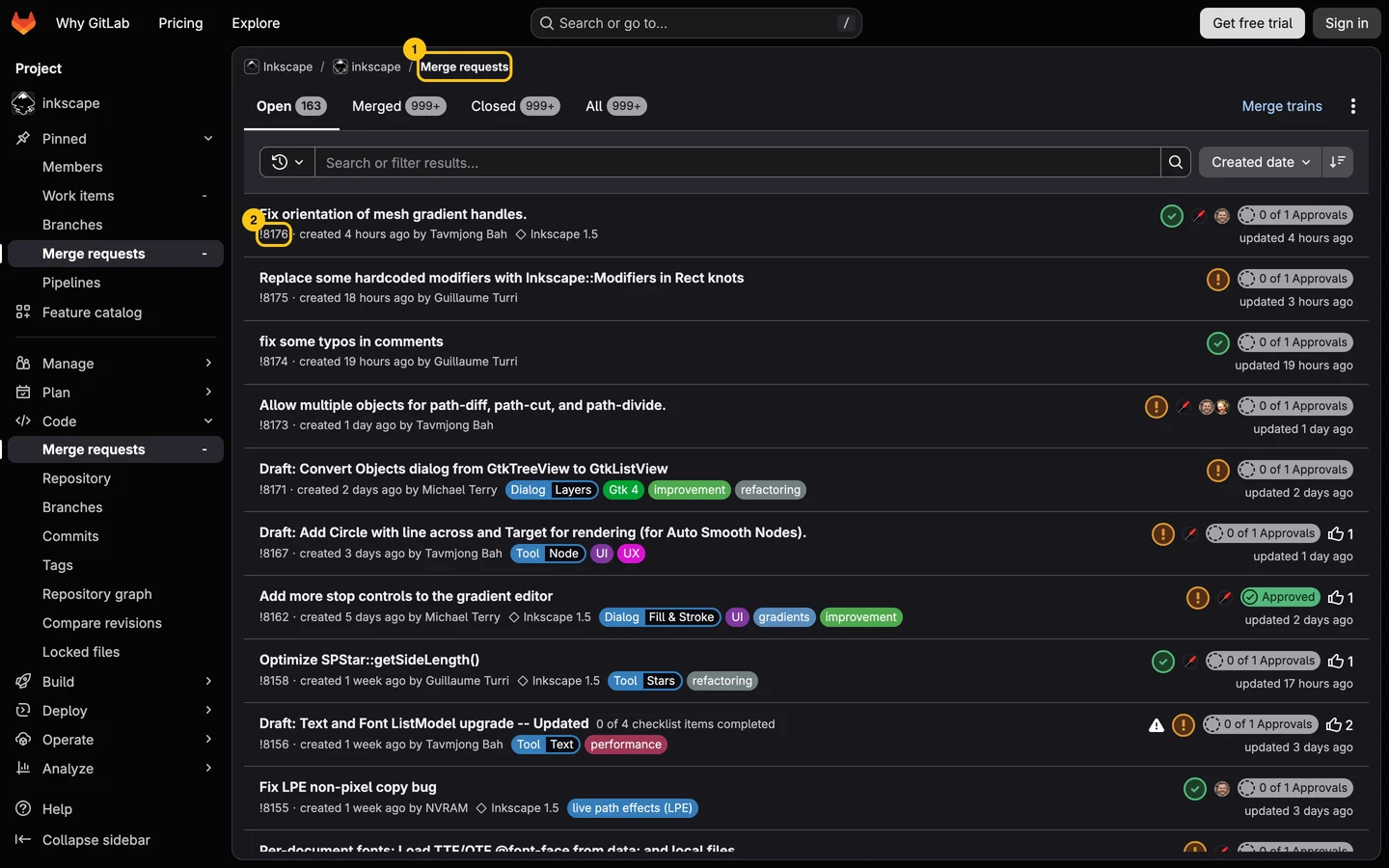
Others, like Inkscape and F-Droid, live on gitlab.com. The flow is the same as on GitHub, under other names: a pull request is a merge request (1), numbered with ! instead of # (2).
| GitHub | GitLab |
|---|---|
| Pull request | Merge request, !123 |
| Organization | Group |
| Actions | CI/CD pipelines, in .gitlab-ci.yml |
Each instance is its own site. Your gitlab.com account doesn’t work on gitlab.gnome.org: you create one there too. gitlab.com’s free tier gives 400 CI minutes a month and 5 users per group; its open source program lifts that to the top tier and 50,000 minutes (as of September 2026).
Codeberg is a non-profit, with Forgejo underneath#
Codeberg is run by Codeberg e.V., a non-profit association in Berlin, and hosts free and open-source projects only. It runs Forgejo, a forge that started as a soft fork of Gitea in late 2022 and became a hard fork in February 2024. If you know GitHub, you know Forgejo: code, issues, pull requests (boxed), actions.

Zig moved there on November 26, 2025, after ten years on GitHub. Forgejo itself is developed on Codeberg. CI runs on Codeberg’s Woodpecker instance, which you ask access to, or on Forgejo Actions with runners you provide (Codeberg’s docs). Forgejo is also a single binary you can host yourself.
On sourcehut and the kernel, you send patches by email#
Some projects have no pull request button. You turn your commits into emails with git send-email, send them to the project’s mailing list, and reviewers answer inline, in their mail client. The Linux kernel and Git itself work that way, on their own mailing lists.
sourcehut is a forge built around it. aerc, a terminal mail client hosted there, asks contributors to configure their clone once, then send:
git config format.subjectPrefix "PATCH aerc"
git config sendemail.to "~rjarry/aerc-devel@lists.sr.ht"
git send-email --annotate -1- git-send-email.io walks you through the setup for your mail provider.
- On sourcehut, contributing is free. Hosting your own projects takes a subscription, from $4 a month, with CI included (as of September 2026).
The older ones, in one line each#
- SourceForge was the big host of the 2000s, and still hosts downloads. In 2015, it wrapped GIMP’s Windows installer in its own, which installed other software: GIMP’s statement says what happened.
- Launchpad is Canonical’s platform for Ubuntu: bug reports, translations and package archives.
- Bitbucket is Atlassian’s, mostly for private company code. Its Mercurial repositories went read-only on July 1, 2020, and were disabled in August 2020.
Side by side#
| As of September 2026 | GitHub | GitLab.com | Codeberg | sourcehut |
|---|---|---|---|---|
| Run by | Microsoft | GitLab Inc. | Codeberg e.V., non-profit | SourceHut |
| How you contribute | Pull request | Merge request | Pull request | Patch by email |
| Cost for a project | Free | Free, 5 users per group | Free, open source only | From $4 a month to host |
| Hosted CI | Free on public repositories | 400 minutes a month | On request, or your runners | Included |
| Host it yourself | Paid (Enterprise Server) | Yes, open core | Yes, Forgejo | Yes, open source |
| Known projects | Bootstrap, VS Code | GNOME, Debian, Inkscape | Zig, Forgejo | aerc |
Which one for you#
To contribute, go where the project is. Create an account on its instance, or set up git send-email once, and read its CONTRIBUTING.md: the rest of this guide applies everywhere, under other names.
For your own project, pick GitHub unless you have a reason not to. It’s where your users and contributors already have an account. If you have a reason, Codeberg and GitLab are good homes, and nothing stops you from pushing to two hosts at once:
git remote set-url --add --push origin git@github.com:you/project.git
git remote set-url --add --push origin git@codeberg.org:you/project.git
git push
Once a remote has a push URL, Git stops pushing to its fetch URL: add both. Every git push then updates the two copies, and one of them is your backup.
Do this now#
- Check where the three projects you use most really live: the GitHub repository can be a mirror, and its README says so.
- If one of them lives on its own GitLab or on Codeberg, create an account there before you need it.
- If you maintain a project, add a second push URL to its remote, so every push leaves a copy somewhere else.
Go further#
- Git and GitHub Basics You Actually Need: the contribution flow, on the platform you’ll use first.
- Reading a Repository in Five Minutes: the same health signals, on any of these platforms.
- Migrating from GitHub to Codeberg: Zig’s reasons, and what the move involved.
- git-send-email.io: the email workflow, set up step by step.